Linear gauge chart
info
Charts are available with Avalonia Pro.
Linear gauge charts visualize a value along a horizontal or vertical bar. They are suited to comparing metrics side by side or showing progress in a linear, space-efficient format.
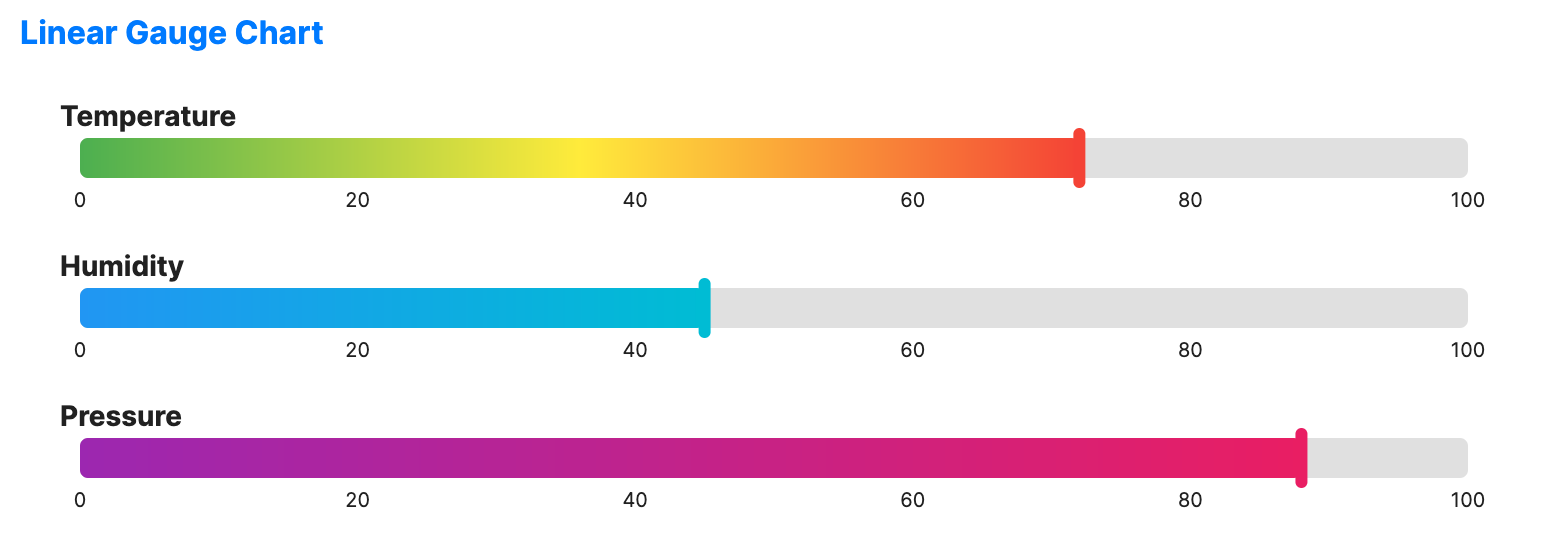
When to use
- Performance bars: Comparing multiple metrics in a condensed dashboard.
- Volume indicators: Showing storage levels, audio levels, or tank capacity.
- Progress tracking: Visualizing a sequence of targets in a straight line.
Code example
XAML
<StackPanel Spacing="15" Margin="10">
    <LinearGaugeChart xmlns="https://github.com/avaloniaui" Title="Temperature" Value="72" MinValue="0" MaxValue="100" Height="60"
                             NeedleBrush="#F44336">
        <LinearGaugeChart.ValueBrush>
            <LinearGradientBrush StartPoint="0%,0%" EndPoint="100%,0%">
                <GradientStop Offset="0" Color="#4CAF50" />
                <GradientStop Offset="0.5" Color="#FFEB3B" />
                <GradientStop Offset="1" Color="#F44336" />
            </LinearGradientBrush>
        </LinearGaugeChart.ValueBrush>
    </LinearGaugeChart>

    <LinearGaugeChart Title="Humidity" Value="45" MinValue="0" MaxValue="100" Height="60"
                             NeedleBrush="#00BCD4">
        <LinearGaugeChart.ValueBrush>
            <LinearGradientBrush StartPoint="0%,0%" EndPoint="100%,0%">
                <GradientStop Offset="0" Color="#2196F3" />
                <GradientStop Offset="1" Color="#00BCD4" />
            </LinearGradientBrush>
        </LinearGaugeChart.ValueBrush>
    </LinearGaugeChart>

    <LinearGaugeChart Title="Pressure" Value="88" MinValue="0" MaxValue="100" Height="60"
                             NeedleBrush="#E91E63">
        <LinearGaugeChart.ValueBrush>
            <LinearGradientBrush StartPoint="0%,0%" EndPoint="100%,0%">
                <GradientStop Offset="0" Color="#9C27B0" />
                <GradientStop Offset="1" Color="#E91E63" />
            </LinearGradientBrush>
        </LinearGaugeChart.ValueBrush>
    </LinearGaugeChart>
</StackPanel>
Common properties
| Property | Description | Default |
|---|---|---|
Value | The current value to display. | 50.0 |
MinValue | Minimum value of the scale. | 0.0 |
MaxValue | Maximum value of the scale. | 100.0 |
Orientation | Orientation of the gauge, Horizontal or Vertical. | Horizontal |
ShowScale | Whether to display the scale. | true |
TrackBrush | Color of the track. | Uses theme default. |
NeedleBrush | Color of the needle indicator. | Uses theme default. |
ValueBrush | Color of the value. | Uses theme default. |
TrackThickness | Thickness of the track. | 20.0 |
Ranges | Optional collection of colored ranges drawn behind the indicator. | null |
ShowMajorTicks | Whether to display major ticks. | false |
ShowMinorTicks | Whether to display minor ticks. | false |
MajorTickInterval | Interval between major ticks. | 20.0 |
MinorTickCount | Number of minor ticks between two major ticks. | 4 |
TickPosition | Where tick marks are drawn relative to the track. | Above |
LabelPosition | Where scale labels are drawn relative to the track. | Below |
Tick position
TickPosition places tick marks around the track. Major ticks are 10 px long. Minor ticks are 5 px long.
| Value | Description |
|---|---|
Above | Above a horizontal track or to the left of a vertical track. Default. |
Below | Below a horizontal track or to the right of a vertical track. |
Cross | Centered on the track. |
In compact layouts, the gauge gives up tick space first, then indicator space, and only then drops scale labels, thinning the track as it goes.