How to bind CanExecute
Overview
Whether a control that can initiate an action is in its enabled state is a key part of "revealed functionality" in user experience design. Disabling commands that cannot run reinforces user confidence. For example, if a button or menu item cannot run because the application is in the wrong state, you should present it as inactive rather than showing an error when it is clicked.
This guide shows you how to bind a Button to a command whose CanExecute logic automatically enables or disables the control. The approach uses the MVVM pattern so that the view and the view model remain clearly separated.
Prerequisites
- A basic Avalonia application with an MVVM structure (a view and a corresponding view model).
- Familiarity with data binding and
ICommand.
Example
In this example, the button can only be clicked when the message is not empty. As soon as the action runs, the message resets to an empty string, which disables the button again.
Define the view
The TextBox binds to the Message property, and the Button binds its Command to ExampleCommand. Avalonia automatically sets the button's IsEnabled state based on the value returned by the command's CanExecute method.
<StackPanel Margin="20">
  <TextBox Margin="0 5" Text="{Binding Message}"
           PlaceholderText="Add a message to enable the button"/>
  <Button Command="{Binding ExampleCommand}">
    Run the example
  </Button>
  <TextBlock Margin="0 5" Text="{Binding Output}" />
</StackPanel>
Create a simple RelayCommand
If you are not using a framework such as CommunityToolkit.Mvvm or ReactiveUI, you can implement a lightweight RelayCommand yourself. The class below wraps an Action for execution and an optional Func<bool> for the can-execute check.
using System;
using System.Windows.Input;

namespace AvaloniaGuides.ViewModels
{
    public class RelayCommand : ICommand
    {
        private readonly Action _execute;
        private readonly Func<bool>? _canExecute;

        public RelayCommand(Action execute, Func<bool>? canExecute = null)
        {
            _execute = execute ?? throw new ArgumentNullException(nameof(execute));
            _canExecute = canExecute;
        }

        public event EventHandler? CanExecuteChanged;

        public bool CanExecute(object? parameter) => _canExecute?.Invoke() ?? true;

        public void Execute(object? parameter) => _execute();

        public void RaiseCanExecuteChanged() =>
            CanExecuteChanged?.Invoke(this, EventArgs.Empty);
    }
}
Implement the view model
In the constructor, the command is created with two parameters: the action to execute, and a function that determines whether the command can run. Whenever Message changes, the property setter calls RaiseCanExecuteChanged so the binding system re-evaluates the button's enabled state.
using System.ComponentModel;
using System.Runtime.CompilerServices;

namespace AvaloniaGuides.ViewModels
{
    public class MainWindowViewModel : INotifyPropertyChanged
    {
        private string _message = string.Empty;
        private string _output = "Waiting...";

        public event PropertyChangedEventHandler? PropertyChanged;

        public string Message
        {
            get => _message;
            set
            {
                if (_message != value)
                {
                    _message = value;
                    OnPropertyChanged();
                    ExampleCommand.RaiseCanExecuteChanged();
                }
            }
        }

        public string Output
        {
            get => _output;
            set
            {
                if (_output != value)
                {
                    _output = value;
                    OnPropertyChanged();
                }
            }
        }

        public RelayCommand ExampleCommand { get; }

        public MainWindowViewModel()
        {
            ExampleCommand = new RelayCommand(
                PerformAction,
                () => !string.IsNullOrWhiteSpace(Message));
        }

        private void PerformAction()
        {
            Output = $"The action was called. {Message}";
            Message = string.Empty;
        }

        protected void OnPropertyChanged([CallerMemberName] string? name = null)
        {
            PropertyChanged?.Invoke(this, new PropertyChangedEventArgs(name));
        }
    }
}
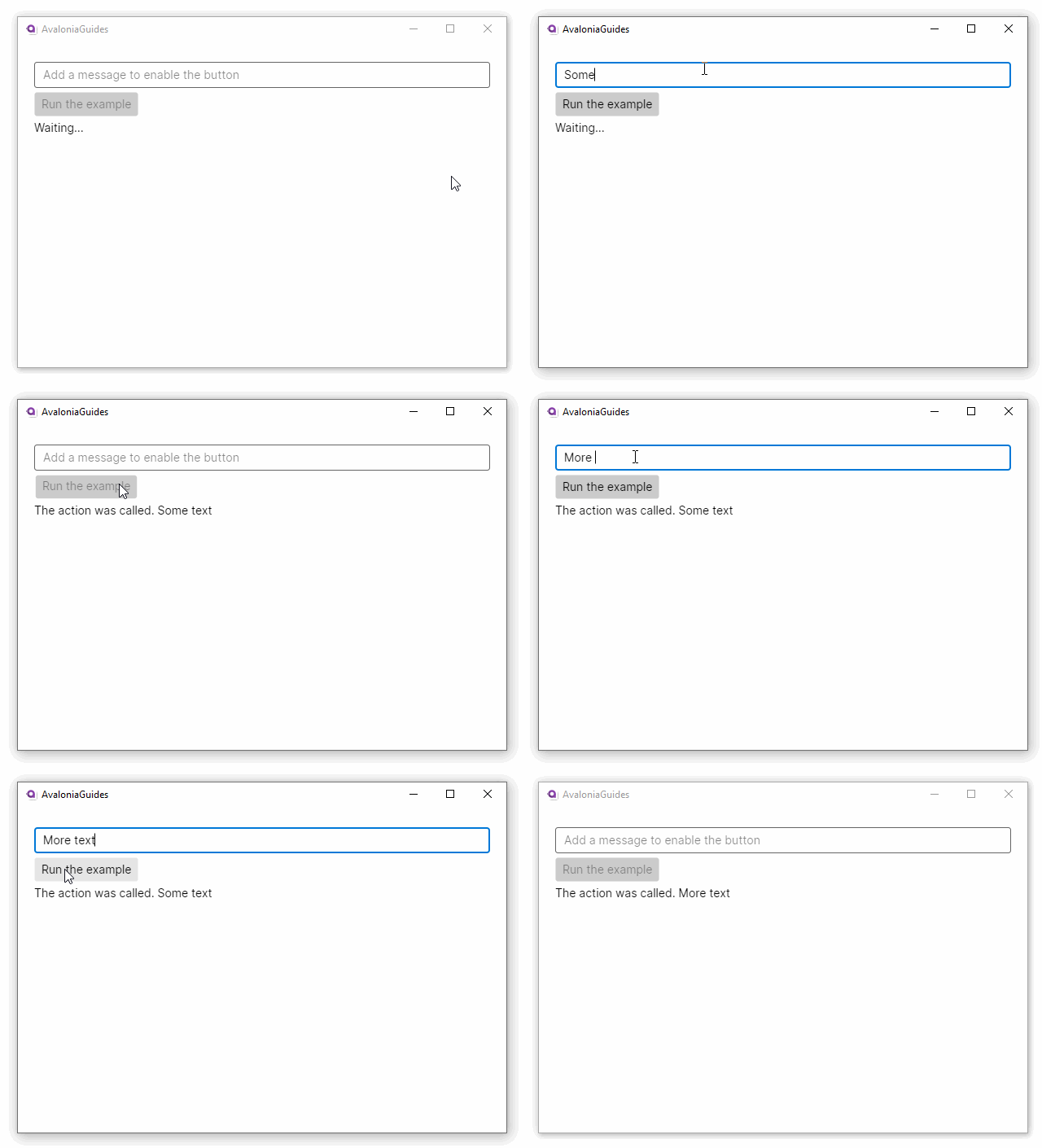
How it works
- When the user types into the
TextBox, theMessageproperty setter fires. - The setter calls
ExampleCommand.RaiseCanExecuteChanged(), which raises theCanExecuteChangedevent. - Avalonia responds to that event by calling
CanExecuteon the command. If the method returnsfalse, the boundButtonis automatically disabled. - When the user clears the text (or the action resets
Messageto an empty string),CanExecutereturnsfalseand the button disables again.
Tips and edge cases
- Always call
RaiseCanExecuteChanged(or an equivalent notification) from every property setter that yourCanExecutefunction depends on. If you forget, the button state will be stale until another event triggers a re-evaluation. - Multiple dependencies. If
CanExecutechecks more than one property, callRaiseCanExecuteChangedin each of those property setters. - Thread safety.
CanExecuteChangedshould be raised on the UI thread. If you update a property from a background thread, dispatch the change to the UI thread first usingDispatcher.UIThread.Post. - Using CommunityToolkit.Mvvm. The
[RelayCommand(CanExecute = nameof(CanRun))]source generator eliminates the boilerplate shown above. The generated command automatically raisesCanExecuteChangedwhen you callNotifyCanExecuteChanged(). - Using ReactiveUI.
ReactiveCommand.Createaccepts acanExecuteobservable. The command re-evaluates automatically whenever the observable emits a new value, so you do not need to raise the event manually. CommandParameterbindings. When you pass aCommandParametervia the binding, the parameter value is forwarded toCanExecute(object? parameter). Make sure your implementation handlesnullparameters during initial layout, before the binding system has resolved the parameter value.- Menu items. The same pattern works with
MenuItem. BindMenuItem.Commandto your command and the menu item dims automatically whenCanExecutereturnsfalse.