VirtualKeyboard control reference
The VirtualKeyboard is a standalone control that provides an on-screen keyboard. This control can be manually placed in your application's layout. Unlike VirtualKeyboardScope, which automatically manages keyboard visibility based on focus, VirtualKeyboard is explicitly directed at a specific target input element.
This control is available as part of Avalonia Pro or higher.
Overview
VirtualKeyboard gives you direct control over keyboard placement and behavior. It sends input directly to its designated target, regardless of which control has input focus. This makes it useful for specialized input scenarios where automatic focus-based keyboard display is inappropriate.
Properties
| Property | Type | Description |
|---|---|---|
Target | IInputElement | Gets or sets the input element to receive keystrokes from the keyboard. |
InputMethods | IEnumerable<VirtualKeyboardInputMethod> | Gets or sets the collection of input methods available to users. |
Usage examples
Minimal implementation
<Window xmlns="https://github.com/avaloniaui"
        xmlns:x="http://schemas.microsoft.com/winfx/2006/xaml">
    <StackPanel>
        <TextBox x:Name="InputField" />
        <VirtualKeyboard Target="{Binding ElementName=InputField}"
                         InputMethods="en-US:kbd:standard" />
    </StackPanel>
</Window>
Multiple input methods
<StackPanel>
    <TextBox x:Name="EmailField" PlaceholderText="Email address" />
    <VirtualKeyboard Target="{Binding ElementName=EmailField}"
                     InputMethods="en-US:kbd:standard, de:kbd:standard, ja:ime:kana" />
</StackPanel>
Code-behind configuration
// Get input methods for specific languages using SelectMany + ToList
var inputMethods = new[] { "en-US", "ja", "de" }
    .SelectMany(VirtualKeyboardInputMethod.GetInputMethodsForLanguage)
    .ToList();

// Create and configure a VirtualKeyboard
var keyboard = new VirtualKeyboard
{
    Target = myTextBox,
    InputMethods = inputMethods
};

// Add it to the visual tree
myContainer.Children.Add(keyboard);
Working with TextInputOptions
TextInputOptions attached properties can be applied to the target element to customize keyboard behavior:
<StackPanel>
    <TextBox x:Name="EmailField"
             TextInputOptions.ContentType="Email"
             TextInputOptions.ReturnKeyType="Next" />

    <VirtualKeyboard Target="{Binding ElementName=EmailField}"
                     InputMethods="en-US:kbd:standard" />
</StackPanel>
When to use VirtualKeyboard vs. VirtualKeyboardScope
Choose VirtualKeyboard when:
- Fixed target: You need the keyboard to always target a specific input control, regardless of focus.
- Specialized input: You're building a custom input experience where focus doesn't drive the keyboard target.
Choose VirtualKeyboardScope when:
- Standard input: You want the keyboard to follow focus automatically.
- Simpler integration: You prefer a container-based approach with fewer configuration options.
- Automatic visibility: You want automatic show/hide behavior based on focus changes.
Best practices
-
Set a valid target.
- Always set the
Targetproperty to a valid input element that can receive keystrokes. - If the target is invalid, the keyboard input will have nowhere to go.
- Always set the
-
Place the keyboard with care.
- Position the keyboard where it won't obscure important content, typically at the bottom of the screen.
VirtualKeyboarddoesn't automatically manage content scrolling, unlikeVirtualKeyboardScope, so you may need to handle scrolling or layout adjustments yourself.
-
Choose relevant input methods.
- Choose input methods appropriate for your target audience.
- For international applications, include layouts for all supported regions.
-
Minimize memory usage.
- If creating keyboards dynamically, remember to remove them from the visual tree when no longer needed.
-
Design a responsive layout.
- Plan your layout to accommodate the keyboard's space requirements.
- Consider using a
Gridwith row definitions to allocate space for the keyboard.
Styling
VirtualKeyboard is styled via named resources. You can override these resources in your application to customize the appearance of keyboard elements.
Customizable resources
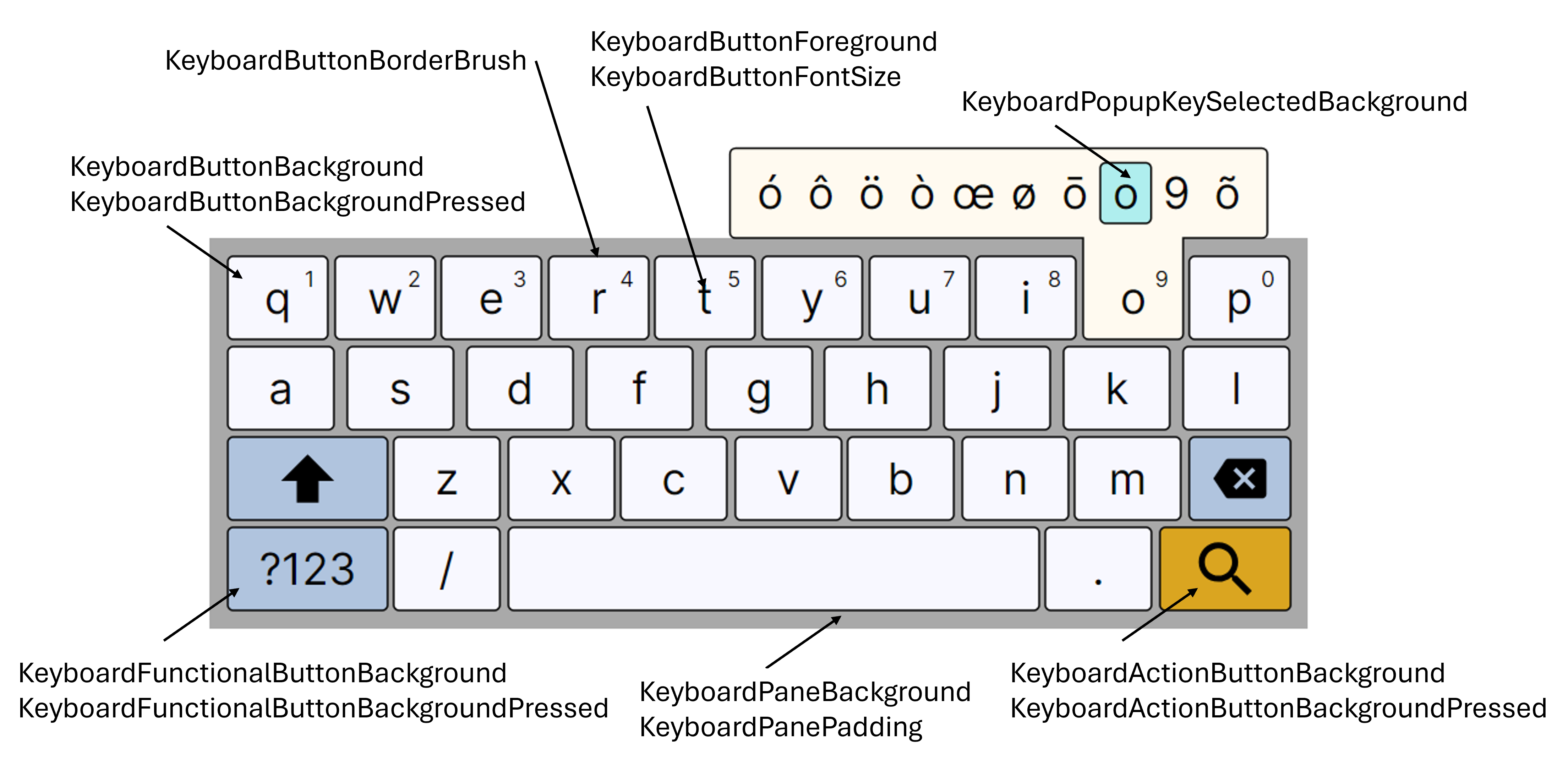
Below is a list of resources you can override in your theme or resource dictionary:
| Key | Type | Default |
|---|---|---|
KeyboardActionButtonBackground | Brush | Goldenrod |
KeyboardActionButtonBackgroundPressed | Brush | PaleGoldenrod |
KeyboardButtonBackground | Brush | GhostWhite |
KeyboardButtonBackgroundPressed | Brush | FloralWhite |
KeyboardButtonBorderBrush | Brush | Black |
KeyboardButtonFontSize | Double | 24 |
KeyboardButtonForeground | Brush | Black |
KeyboardFunctionalButtonBackground | Brush | LightSteelBlue |
KeyboardFunctionalButtonBackgroundPressed | Brush | LightBlue |
KeyboardPaneBackground | Brush | DarkGray |
KeyboardPanePadding | Thickness | 4 |
KeyboardPopupKeySelectedBackground | Brush | PaleTurquoise |
How to override
To customize, define these resources in your application theme or resource dictionary. For example:
<SolidColorBrush x:Key="KeyboardButtonForeground" Color="#FF0000" />
Example: Custom theme
<ResourceDictionary>
  <SolidColorBrush x:Key="KeyboardPaneBackground" Color="#FFD700" />
  <system:Double x:Key="KeyboardButtonFontSize">36</system:Double>
  <!-- Add more overrides as needed -->
</ResourceDictionary>
Input methods
| Identifier | Description | Notes |
|---|---|---|
af:kbd:standard | Afrikaans | |
ar:kbd:standard | Arabic | |
hy-AM:kbd:standard | Armenian (Armenia) Phonetic | |
az-AZ:kbd:standard | Azerbaijani (Azerbaijan) | |
eu-ES:kbd:standard | Basque (Spain) | |
be-BY:kbd:standard | Belarusian (Belarus) | |
bn-BD:kbd:standard | Bengali (Bangladesh) | |
bn-IN:kbd:standard | Bengali (India) | |
bg:kbd:standard | Bulgarian | |
bg:kbd:bds | Bulgarian (BDS) | |
ca:kbd:standard | Catalan | |
hr:kbd:standard | Croatian | |
cs:kbd:standard | Czech | |
da:kbd:standard | Danish | |
nl:kbd:standard | Dutch | |
nl-BE:kbd:standard | Dutch (Belgium) | |
en-GB:kbd:standard | English (Great Britain) | |
en-IN:kbd:standard | English (India) | |
en-US:kbd:standard | English (United States) | |
eo:kbd:standard | Esperanto | |
et-EE:kbd:standard | Estonian (Estonia) | |
fi:kbd:standard | Finnish | |
fr:kbd:standard | French | |
fr-CA:kbd:standard | French (Canada) | |
fr-CH:kbd:standard | French (Switzerland) | |
gl-ES:kbd:standard | Galician (Spain) | |
ka-GE:kbd:standard | Georgian (Georgia) | |
de:kbd:standard | German | |
de-CH:kbd:standard | German (Switzerland) | |
el:kbd:standard | Greek | |
hi:kbd:standard | Hindi | |
hi:kbd:compact | Hindi (Compact) | |
hu:kbd:standard | Hungarian | |
is:kbd:standard | Icelandic | |
it:kbd:standard | Italian | |
it-CH:kbd:standard | Italian (Switzerland) | |
ja:ime:kana | Japanese (Kana) | |
ko:ime:hangul | Korean (Hangul) | |
kn-IN:kbd:standard | Kannada (India) | |
kk:kbd:standard | Kazakh | |
km-KH:kbd:standard | Khmer (Cambodia) | |
ky:kbd:standard | Kyrgyz | |
lo-LA:kbd:standard | Lao (Laos) | |
lv:kbd:standard | Latvian | |
lt:kbd:standard | Lithuanian | |
mk:kbd:standard | Macedonian | |
ml-IN:kbd:standard | Malayalam (India) | |
mr-IN:kbd:standard | Marathi (India) | |
mn-MN:kbd:standard | Mongolian (Mongolia) | |
ne-NP:kbd:romanized | Nepali (Romanized) | |
ne-NP:kbd:traditional | Nepali (Traditional) | |
nb:kbd:standard | Norwegian Bokmål | |
fa:kbd:standard | Persian | |
pl:kbd:standard | Polish | |
pt-BR:kbd:standard | Portuguese (Brazil) | |
pt-PT:kbd:standard | Portuguese (Portugal) | |
ro:kbd:standard | Romanian | |
ru:kbd:standard | Russian | |
sr-Cyrl:kbd:standard | Serbian (Cyrillic) | |
sr-Latn:kbd:standard | Serbian (Latin) | |
sk:kbd:standard | Slovak | |
sl:kbd:standard | Slovenian | |
es:kbd:standard | Spanish | |
es-419:kbd:standard | Spanish (Latin America) | |
es-US:kbd:standard | Spanish (United States) | |
sw:kbd:standard | Swahili | |
sv:kbd:standard | Swedish | |
tl:kbd:standard | Tagalog | |
ta-IN:kbd:standard | Tamil (India) | |
ta-SG:kbd:standard | Tamil (Singapore) | |
te-IN:kbd:standard | Telugu (India) | |
th:kbd:standard | Thai | |
tr:kbd:standard | Turkish | |
uk:kbd:standard | Ukrainian | |
uz-UZ:kbd:standard | Uzbek (Uzbekistan) | |
vi:kbd:standard | Vietnamese | |
zu:kbd:standard | Zulu | |
zh:ime:rime | Chinese (RIME) | Requires the Avalonia.Controls.VirtualKeyboard.Ime.Rime plugin package. |
RIME input method engine
The RIME input method engine provides Chinese text input (Pinyin and more). It is distributed as a separate plugin package that bundles native binaries and schema data.
Installing RIME
dotnet add package Avalonia.Controls.VirtualKeyboard.Ime.Rime
This package includes the RIME native binary for all supported platforms and the Luna Pinyin schema data.
Enabling RIME
Call WithVirtualKeyboardRimePlugin() on your AppBuilder and ensure DataPath is set in VirtualKeyboardOptions:
using Avalonia.Controls;

public static AppBuilder BuildAvaloniaApp()
    => AppBuilder.Configure<App>()
        .UsePlatformDetect()
        .WithVirtualKeyboardOptions(new VirtualKeyboardOptions
        {
            DataPath = Path.Combine(
                Environment.GetFolderPath(Environment.SpecialFolder.LocalApplicationData),
                "MyApp", "keyboard-data")
        })
        .WithVirtualKeyboardRimePlugin()
        .LogToTrace();
VirtualKeyboardOptions.DataPath is required when using RIME. This path specifies a writable directory where RIME stores user dictionaries and compiled schema data. If DataPath is not set, the application will throw an InvalidOperationException at startup.
Using RIME in XAML
<VirtualKeyboardScope InputMethods="en-US:kbd:standard, zh:ime:rime">
    <StackPanel>
        <TextBox PlaceholderText="Type in English or Chinese"/>
    </StackPanel>
</VirtualKeyboardScope>
See also
- VirtualKeyboardScope: A container control that automatically manages keyboard visibility,