Embedding web content
Overview
The Avalonia WebView component provides native web browser functionality for your Avalonia applications. Unlike embedded WebView solutions that require bundling Chromium, this implementation leverages the platform's native web rendering capabilities, resulting in smaller application size and better performance.
The WebView component includes three main APIs:
NativeWebView- A control for embedding web content directly in your application UINativeWebDialog- A separate dialog window that hosts web contentWebAuthenticationBroker- A utility for handling OAuth and web-based authentication flows
The WebView component is available with both Avalonia and Avalonia XPF. For XPF-specific installation and usage, see the XPF section below.
Installation
Add the WebView package to your project:
dotnet add package Avalonia.Controls.WebView
Basic usage
NativeWebView
On Linux, NativeWebView uses WPE WebKit and renders offscreen. Make sure the WPE runtime libraries are installed — see Linux prerequisites. If WPE is not available on the target system, use NativeWebDialog instead.
<Window xmlns="https://github.com/avaloniaui"
        xmlns:x="http://schemas.microsoft.com/winfx/2006/xaml">

    <NativeWebView Source="https://avaloniaui.net/"
                   NavigationCompleted="WebView_NavigationCompleted" />
</Window>
private void WebView_NavigationCompleted(object? sender, WebViewNavigationCompletedEventArgs args)
{
    if (args.IsSuccess)
    {
        // Navigation completed successfully
    }
}
Bidirectional JavaScript execution
In some situations it's necessary to execute arbitrary JavaScript code from the web view control.
NativeWebView provides InvokeScript async method:
webView.InvokeScript("console.log('Hello World')");
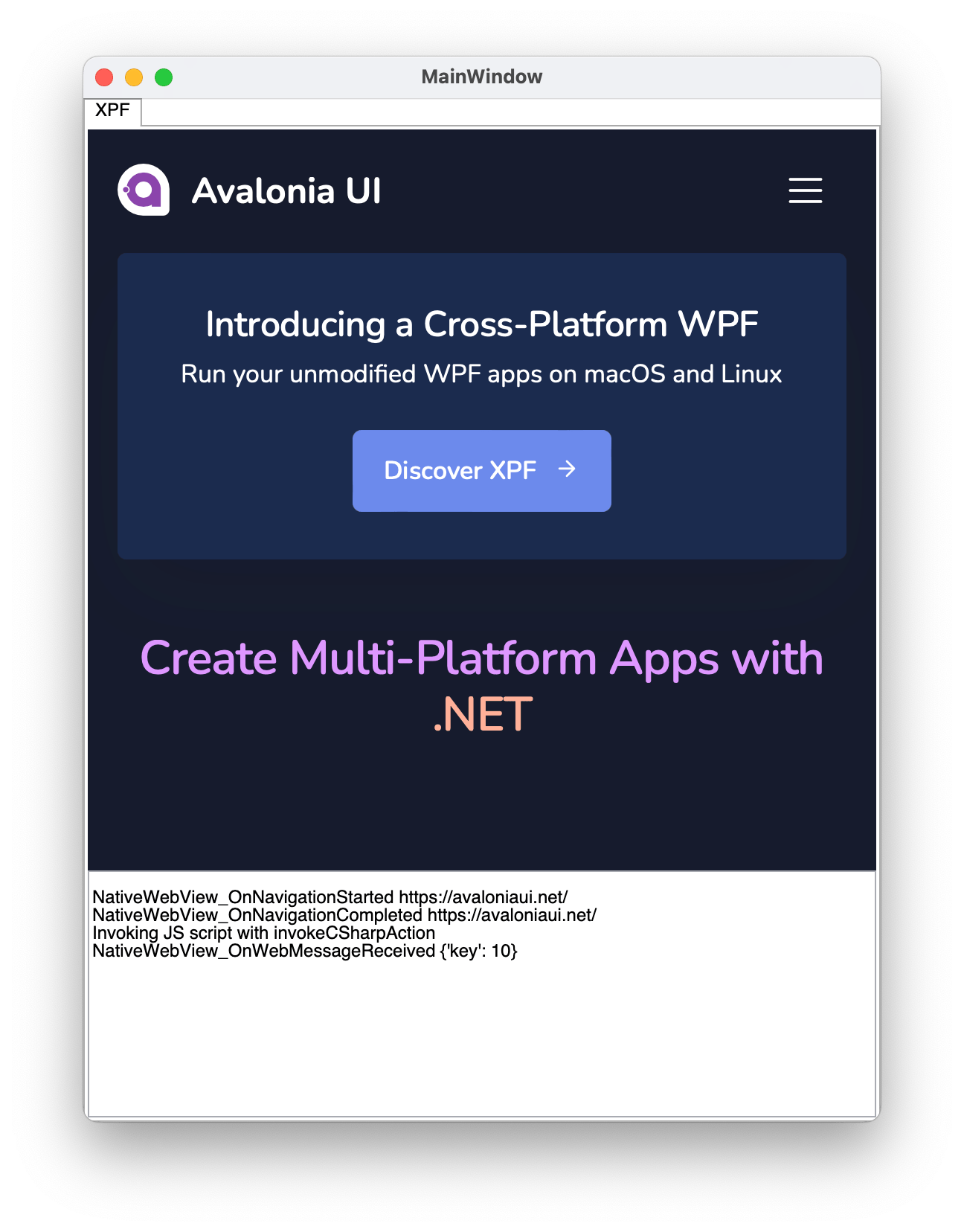
When it's required to receive data from the JavaScript (web page) and process it on the C# side, you can use the NativeWebView.WebMessageReceived event combined with the invokeCSharpAction helper JS method.
Complete bi-directional example:
private async void NativeWebView_OnNavigationCompleted(object? sender, WebViewNavigationCompletedEventArgs e)
{
    await ((NativeWebView)sender!).InvokeScript(""" invokeCSharpAction("{'key': 10}") """);
}

private void NativeWebView_OnWebMessageReceived(object? sender, WebMessageReceivedEventArgs e)
{
    var message = e.Body;
    // message == "{'key': 10}"
}
NativeWebDialog
var dialog = new NativeWebDialog
{
    Title = "Avalonia Docs",
    CanUserResize = true,
    Source = new Uri("https://docs.avaloniaui.net/")
};

dialog.NavigationCompleted += (s, e) =>
{
    if (e.IsSuccess)
    {
        // Navigation completed successfully
    }
};

dialog.Show();
WebAuthenticationBroker
var authOptions = new WebAuthenticatorOptions(
    RequestUri: new Uri("https://accounts.google.com/o/oauth2/auth?response_type=code&client_id=YOUR_CLIENT_ID&redirect_uri=http://localhost&scope=openid"),
    RedirectUri: new Uri("http://localhost")
);

var result = await WebAuthenticationBroker.AuthenticateAsync(mainWindow, authOptions);

if (result.CallbackUri != null)
{
    // Process authentication result
    var code = HttpUtility.ParseQueryString(result.CallbackUri.Query)["code"];
}
Replace YOUR_CLIENT_ID with the client ID for your application.
Platform prerequisites
The WebView component relies on native web rendering implementations that must be available on the user's machine.
Summary
| Component | Windows | macOS | Linux | iOS | Android | Browser |
|---|---|---|---|---|---|---|
| NativeWebView | ✓ | ✓ | ✓* | ✓ | ✓ | ✗ |
| NativeWebDialog | ✓ | ✓ | ✓ | ✗ | ✗ | ✗ |
| WebAuthenticationBroker | ✓** | ✓ | ✓** | ✓ | ✓*** | ✓**** |
* On Linux, NativeWebView uses WPE WebKit when it is installed and WebKitGTK otherwise. See Linux for the packages each backend needs.
** Uses NativeWebDialog implementation
*** Android support is experimental
**** Requires CORS configuration for the redirect page. .NET 10 is also necessary to run this library in browser.
Windows
Uses Microsoft Edge WebView2, which is:
- Pre-installed on Windows 11
- May need installation on Windows 10
For Windows 10 users, you can include the WebView2 runtime with your installer:
macOS/iOS
Uses WKWebView which is pre-installed on all modern macOS/iOS devices.
- No additional setup required
- For WebAuthenticationBroker: macOS 10.15+ or iOS 12.0+ required
Linux
Linux has two backends, and the backend is chosen automatically:
- WebKitGTK is the baseline.
NativeWebDialogalways uses it, andNativeWebViewuses it whenever WPE is not installed. No configuration is required. - WPE WebKit is optional, and
NativeWebViewprefers it when its libraries are present. It renders offscreen (SHM) and has no hard dependency on GTK, so it composes into the Avalonia visual tree without native window embedding and works on both X11 and Wayland sessions.
WebKitGTK
Install GTK 3, WebKitGTK 4.1 and libsoup 3.
Debian/Ubuntu:
sudo apt install libgtk-3-0 libwebkit2gtk-4.1-0 libsoup-3.0-0
Fedora:
sudo dnf install gtk3 webkit2gtk4.1 libsoup3
Arch:
sudo pacman -S gtk3 webkit2gtk-4.1 libsoup3
libwebkit2gtk-4.0 and libsoup-2.4 are also accepted for older distributions, but 4.1 and soup-3 are recommended. WebKitGTK 6.0, the GTK 4 build, is not supported.
WPE WebKit (optional)
Debian 13 (trixie) or newer:
sudo apt install libwpewebkit-2.0-1
Fedora:
sudo dnf install dnf-plugins-core
sudo dnf copr enable philn/wpewebkit
sudo dnf install wpewebkit
Arch:
sudo pacman -S wpewebkit
Ubuntu does not package WPE WebKit. It was removed in Ubuntu 22.10 (LP #1981592) and has not returned, so libwpewebkit-2.0-1 cannot be installed there. This needs no action: NativeWebView falls back to WebKitGTK on its own.
X11 and Wayland
WPE requires neither X11 nor GTK. WebKitGTK does require the x11 GDK backend, which is available under a Wayland session through XWayland.
Checking what is installed
WebViewAdapterInfo.GetAdapterInfo reports whether a backend's libraries were found, which separates a missing library from a backend that loaded but is not rendering:
var gtk = WebViewAdapterInfo.GetAdapterInfo(WebViewAdapterType.WebKitGtk);
var wpe = WebViewAdapterInfo.GetAdapterInfo(WebViewAdapterType.WpeWebKit);

Console.WriteLine($"WebKitGTK: {gtk.IsInstalled} {gtk.Version} {gtk.UnavailableReason}");
Console.WriteLine($"WPE WebKit: {wpe.IsInstalled} {wpe.Version} {wpe.UnavailableReason}");
Android
Requires Android API 21 or higher.
Native browser interop
The Avalonia WebView component provides cross-platform web content rendering capabilities by utilizing native platform web view. However, sometimes you need to access platform-specific APIs that aren't exposed through the Avalonia WebView abstraction layer.
This document explains how to obtain native handles and perform interop with the underlying browser implementations on each supported platform.
Getting handle
To access native browser functionality, you first need to obtain the platform-specific handle from your WebView control.
For WebView controls
Use the TryGetPlatformHandle() method on your WebView instance:
if (myWebView.TryGetPlatformHandle() is IWindowsWebView2PlatformHandle handle)
{
    // Cast to platform-specific interface and use
}
For WebView dialogs
Use the TryGetWebViewPlatformHandle() method on your WebView dialog instance:
if (myWebViewDialog.TryGetWebViewPlatformHandle() is IWindowsWebView2PlatformHandle handle)
{
    // Cast to platform-specific interface and use
}
Interop
Windows
Avalonia's WebView on Windows supports two adapters:
- WebView2: Modern Chromium-based Edge (recommended)
- WebView1: Legacy Edge (fallback for older Windows 10 installations without WebView2)
Both adapters operate with classic COM interop.
IDL definition files can be found in the Microsoft.Web.WebView2 nuget package (in case of WebView2), Windows SDK (in case of WebView1) or on the internet.
Recommended Approach: Use the new [GeneratedComInterface] attribute for fast, trimmer/AOT-friendly COM interop.
Alternative Solutions:
public interface IWindowsWebView2PlatformHandle : IPlatformHandle
{
    /// Returns COM handle to the ICoreWebView2 [76ECEACB-0462-4D94-AC83-423A6793775E] COM interface
    IntPtr CoreWebView2 { get; }
    /// Returns COM handle to the ICoreWebView2 [4D00C0D1-9434-4EB6-8078-8697A560334F] COM interface
    IntPtr CoreWebView2Controller { get; }
}
public interface IWindowsWebView1PlatformHandle : IPlatformHandle
{
    /// Returns COM handle to the IWebViewControl [3F921316-BC70-4BDA-9136-C94370899FAB] COM interface.
    IntPtr WebViewControl { get; }
}
MacOS/iOS
Recommended Approach: Use official .NET Xamarin.Native macOS/iOS bindings for strongly-typed wrappers. Typically using NSObject.GetNSObject<WKWebView>(IntPtr, false).
var wkWebView = NSObject.GetNSObject<WKWebView>(handle.WKWebView, false);
Alternative: Use objc_msgSend P/Invokes for direct native API access (more control but harder to maintain).
public interface IAppleWKWebViewPlatformHandle : IPlatformHandle
{
    IntPtr WKWebView { get; }
    IntPtr GetWKWebViewRetained();
}
Linux (WPE WebKit)
When NativeWebView runs on the WPE backend, the platform handle exposes both the WebKitWebView GObject and the underlying wpe_view_backend struct, allowing direct P/Invoke against the WPEWebKit API.
public interface ILinuxWpePlatformHandle : IPlatformHandle
{
    /// Pointer to the WebKitWebView GObject instance.
    IntPtr WebKitWebView { get; }

    /// Pointer to the wpe_view_backend native struct.
    IntPtr WpeViewBackend { get; }
}
Linux (WebKitGTK)
NativeWebDialog always exposes a WebKitGTK handle, and NativeWebView exposes one whenever it runs on the WebKitGTK backend. The provided WebKitWebView IntPtr can be used directly with WebKit P/Invokes from the official WebKitGTK reference.
public interface IGtkWebViewPlatformHandle : IPlatformHandle
{
    IntPtr WebKitWebView { get; }
}
Android
Use official .NET Xamarin.Android bindings for the easiest managed wrapper access.
Refer to the Android.Webkit.WebView documentation for usage details.
public interface IAndroidWebViewPlatformHandle : IPlatformHandle
{
    IntPtr WebKitWebView { get; }
}
XPF
The WebView component is also available for Avalonia XPF applications. All WebView functionality, APIs, and platform prerequisites described above apply to XPF as well, with the differences noted below.
Installation
First, make sure you have installed the XPF NuGet feed as per the instructions.
With the NuGet feed configured, install the Avalonia.Xpf.Controls.WebView package:
<PackageReference Include="Avalonia.Xpf.Controls.WebView" Version="11.3.9" />
Use the latest version if available. You can check for newer versions in the IDE NuGet Packages window.
On Windows, when WebView2 is not available, legacy Internet Explorer is embedded. This is useful when targeting older Windows versions.
Usage
Add the XPF namespace to your XAML file and use NativeWebView:
<wpf:NativeWebView xmlns:wpf="clr-namespace:Avalonia.Xpf.Controls;assembly=Avalonia.Xpf.Controls.WebView"
                   Source="https://avaloniaui.net/" />
The Source property is bindable. All other APIs (NativeWebDialog, WebAuthenticationBroker, JavaScript interop) work the same as described in the sections above.
To streamline code migration, you can also use the NativeWebView control with native WPF on Windows without XPF. In this scenario, all API members and underlying browsers are the same, and the same package can be used.